
Sound Setup
Sound Files
[FilesMouse here]Droid Sounds.zip
SparkFun MP3 Trigger
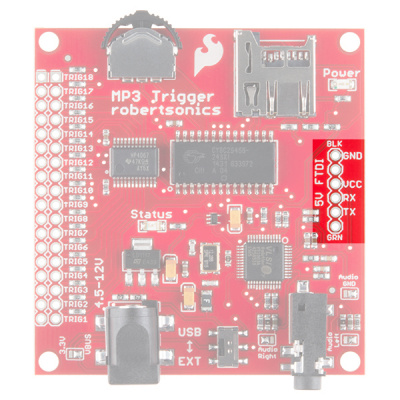
The SparkFun MP3 Trigger board needs three wires between the Shadow Master Control board and the Trigger board, Black (ground), Red (5v vin), and White (signal).
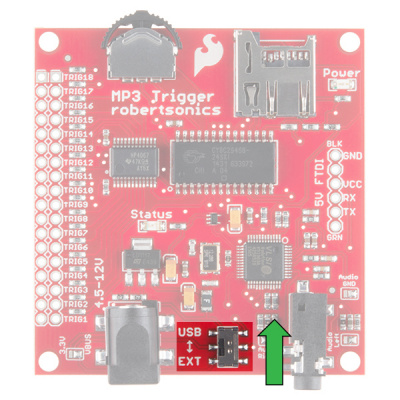
You'll also need to make sure the power selector switch at the bottom or the board is switched to "USB" and not "EXT.
Setting up the sound files
This board uses your average Micro SD card, a large card is not necessary, 1gb to 8 gb is way more than enough for this.
The card should be formatted with FAT32,FAT32, and the then put your MP3 files onto the SD Card.
The SF board is pretty easy to understand when it comes to how you tell the board what file to play, each file should be renamed to have a 3 digit prefix at the beginning.
Starting with "001" through "018" enables you to order your files and address them, these prefixes also correspond to the 18 trigger pins on the board.
Example Filenames
- 001FileName.mp3 - Without a space
- 002 FileName.mp3 - With a space
Both versions are valid and you can mix formatting.
You won't need to solder to the long row on the left since Shadow is using a Serial connection (via the White wire to RX) and the Shadow code sends the appropriate signal.
The Shadow MSE code already has buttons mapped to certain trigger numbers.
Button Mapping
- D-pad Up - Sound 001
- D-pad Right - Sound 002
- D-pad Down - Sound 003
- D-pad Left - Random Sound 001-015
- Circle/L2 + D-pad Up - Sound 004
- Cross/L2 + D-pad Right - Sound 005
- Not Available/L2 + D-pad Down - Sound 006
- Not Available/L2 + D-pad Left - Sound 015
- L1 + D-pad Up - Volume Up
- L1 + D-pad Right - Sound 019
- L1 + D-pad Down - Volume Down
- L1 + D-pad Left - Sound 018